> ## Documentation Index
> Fetch the complete documentation index at: https://docs.contraforce.com/llms.txt
> Use this file to discover all available pages before exploring further.
# Entity Insights
> Enrich your investigations with detailed entity insights. View sign-in logs, audit trails, threat intelligence, and related incidents for users, devices, IPs, and more.
Entity Insights provide rich context during incident investigations. Instead of switching between tools to gather information about affected users, devices, or IP addresses, ContraForce surfaces relevant data directly within the incident view.
Available insights vary by entity type and your connected data sources. The more integrations you have enabled, the richer your entity insights will be.
## Why Entity Insights Matter
Access critical context without leaving ContraForce
See related incidents, logs, and threat intel in one place
Make informed response choices with full entity context
***
## Available Insights by Entity Type
ContraForce provides different insights depending on the entity type associated with an incident.
**User entities** include accounts, identities, and mailboxes.
| Insight | Description |
| --------------------- | ----------------------------------------------------------------------- |
| **Related Incidents** | Other incidents involving this user |
| **Sign-In Logs** | Authentication history including locations, devices, and outcomes |
| **Audit Logs** | Administrative actions and changes made by or to this user |
| **User Insights** | Account details, group memberships, risk score, and profile information |
*Use cases: Investigating compromised accounts, tracking lateral movement, understanding user behavior patterns*
**Device entities** include endpoints, servers, and mobile devices.
| Insight | Description |
| --------------------- | ------------------------------------------------------------ |
| **Timeline** | Chronological view of events and activities on the device |
| **Related Incidents** | Other incidents involving this device |
| **Device Insights** | Hardware details, OS version, security state, exposure level |
*Use cases: Tracking malware spread, understanding attack chains, assessing device health*
**IP entities** include source and destination addresses from network activity.
| Insight | Description |
| --------------------- | ----------------------------------------------------- |
| **Related Incidents** | Other incidents involving this IP address |
| **IP Insight Logs** | Geolocation, reputation, ASN, and historical activity |
*Use cases: Identifying malicious infrastructure, tracking C2 communications, investigating data exfiltration*
**Email entities** include messages, attachments, and sender/recipient information.
| Insight | Description |
| --------------------- | --------------------------------------------------------------- |
| **Email Insights** | Message details, headers, attachments, and delivery information |
| **Related Incidents** | Other incidents involving this email or sender |
*Use cases: Investigating phishing campaigns, tracking malicious attachments, analyzing email-based attacks*
**File entities** include executables, documents, scripts, and their hashes.
| Insight | Description |
| --------------------- | --------------------------------------------------------------------- |
| **Related Incidents** | Other incidents involving this file or hash |
| **File Insights** | File metadata, hash values, detection ratios, and threat intelligence |
*Use cases: Tracking malware variants, identifying suspicious files, correlating file-based IOCs*
**URL entities** include web addresses and domains involved in incidents.
| Insight | Description |
| --------------------- | ---------------------------------------------------------------- |
| **Related Incidents** | Other incidents involving this URL or domain |
| **URL Insights** | Domain reputation, registration details, and threat intelligence |
*Use cases: Investigating phishing links, blocking malicious domains, tracking web-based threats*
***
## Accessing Entity Insights
Follow these steps to view insights for any entity in an incident.
From the Command Page, click the **Incident ID** in the Incidents table to open the compact incident overview
Click the **diagonal arrows** icon (next to the X) in the top right corner to open the detailed incident view
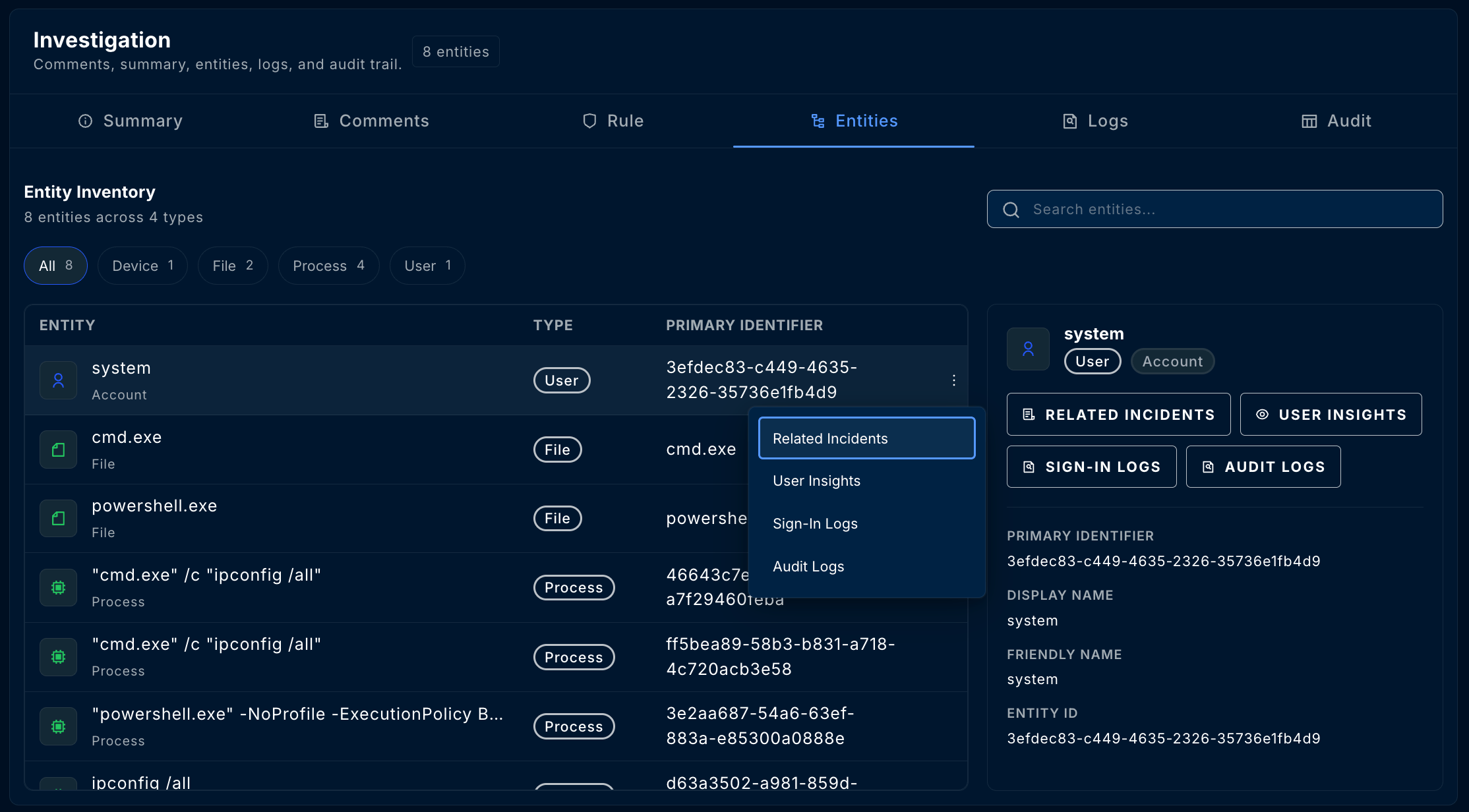
Click the **Entities** tab to see all associated entities
Click the **three dots (⋮)** on any entity row to see available insights
Choose the insight you want to view from the dropdown menu
 ***
## Working with Insights
### Multiple Insights
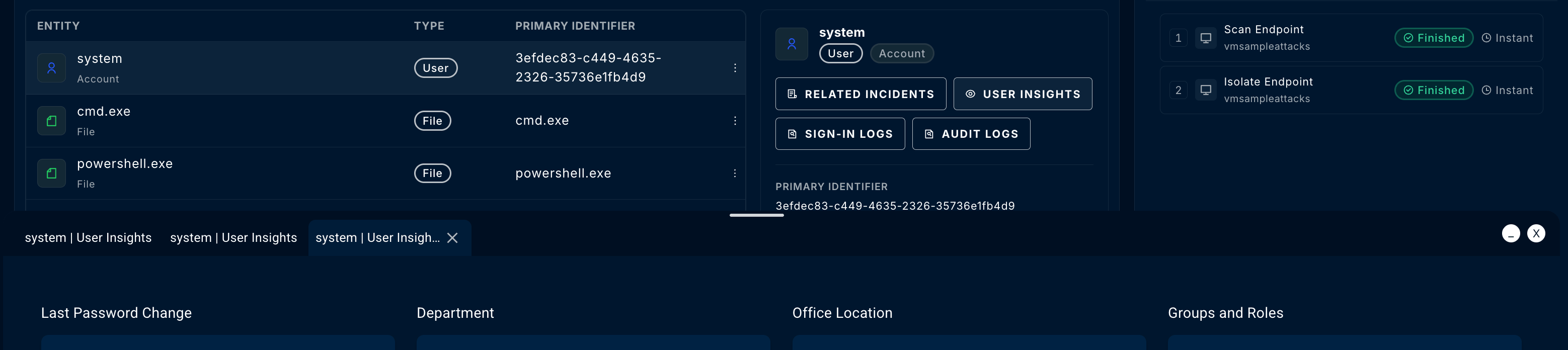
You can open multiple insights simultaneously:
* Each insight opens in its own **tab** within the popup window
* Switch between tabs to compare information
* The popup window can be **resized** for better viewing
***
## Working with Insights
### Multiple Insights
You can open multiple insights simultaneously:
* Each insight opens in its own **tab** within the popup window
* Switch between tabs to compare information
* The popup window can be **resized** for better viewing
 ### Insight Details
Each insight type displays relevant information in an organized format:
**Columns typically include:**
* Timestamp
* Sign-in status (Success/Failure)
* IP address and location
* Device and browser information
* Conditional access results
* Risk level
**Filter by:** Date range, status, location, risk level
**Columns typically include:**
* Timestamp
* Activity type
* Target resource
* Initiated by (user/service)
* Result (Success/Failure)
**Filter by:** Date range, activity type, target
**Information displayed:**
* Display name and UPN
* Job title and department
* Manager
* Group memberships
* Account status
* Risk score
* Last sign-in
**Information displayed:**
* Device name and ID
* OS platform and version
* Health state
* Exposure level
* Last seen timestamp
* Compliance status
* Logged-on users
**Information displayed:**
* Geolocation (country, city)
* ASN and ISP
* Reputation score
* Associated domains
* Historical activity
* Threat intelligence matches
**Information displayed:**
* File name and path
* SHA256, SHA1, MD5 hashes
* File size
* First/last seen
* Detection ratio
* Threat intelligence enrichment
***
## Related Incidents
The **Related Incidents** insight is available for all entity types and shows other incidents where the same entity appears.
### Why This Matters
* **Pattern Detection** — Identify if an entity is repeatedly involved in security events
* **Attack Chain Analysis** — Understand how an attacker moved through your environment
* **Scope Assessment** — Determine the full impact of a compromise
* **False Positive Identification** — Recognize legitimate activity that triggers multiple alerts
### Using Related Incidents
| Column | Description |
| --------------- | ---------------------------------- |
| **Incident ID** | Click to open the related incident |
| **Title** | Brief description of the incident |
| **Severity** | High, Medium, Low, Informational |
| **Status** | Current state of the incident |
| **Created** | When the incident was detected |
If you see the same entity in multiple high-severity incidents, prioritize investigating that entity—it may indicate an active compromise.
***
## Threat Intelligence Enrichment
Some entity insights include threat intelligence from integrated sources.
### Supported Enrichments
| Entity Type | Threat Intel Data |
| -------------- | -------------------------------------------------------- |
| **IP Address** | Reputation, malicious activity history, blocklist status |
| **File/Hash** | VirusTotal detections, malware family, first seen date |
| **URL/Domain** | Reputation, phishing indicators, domain age |
| **User** | Compromised credential alerts, risk indicators |
Threat intelligence enrichment requires integration with tools like VirusTotal or Microsoft Defender Threat Intelligence. Contact your administrator to enable additional enrichment sources.
***
## Integration-Specific Insights
Available insights depend on which integrations are connected to your workspace.
### Microsoft Defender for Endpoint
* Device timeline and alerts
* User sign-in and audit logs
* Email trace and threat detection
* File and URL analysis
### Microsoft Sentinel
* Log Analytics query results
* Custom entity enrichments
* Watchlist matches
* Threat intelligence indicators
### Third-Party Integrations
Additional insights may be available based on your connected tools:
* **CrowdStrike** — Device details, detection history
* **SentinelOne** — Agent status, threat indicators
***
## Best Practices
Always check Related Incidents first. If an entity appears in multiple incidents, it may be the key to understanding the attack scope.
Compare sign-in logs with the incident timeline. Look for unusual locations, impossible travel, or authentication failures before the incident.
When investigating compromised accounts, review audit logs for privilege changes, group membership modifications, or unusual administrative actions.
For device-based incidents, the timeline shows the sequence of events leading to detection—crucial for understanding initial access and lateral movement.
Copy important insight data to incident comments for team visibility and post-incident documentation.
***
## Troubleshooting
### Common Issues
| Issue | Possible Cause | Solution |
| ------------------------- | ----------------------------------- | ------------------------------------------------------ |
| **No insights available** | Entity type not supported | Check the Capabilities Matrix for supported entities |
| **Missing sign-in logs** | Entra ID integration not connected | Verify Azure AD/Entra ID connector status |
| **Empty device timeline** | Defender for Endpoint not onboarded | Confirm MDE integration is enabled |
| **No threat intel data** | Enrichment source not configured | Contact admin to enable VirusTotal or other TI sources |
***
## Related Guides
Complete incident investigation workflow
Deep dive investigation interface
Take action on entities after investigation
***
Questions about entity insights? Contact us at [support@contraforce.com](mailto:support@contraforce.com).
### Insight Details
Each insight type displays relevant information in an organized format:
**Columns typically include:**
* Timestamp
* Sign-in status (Success/Failure)
* IP address and location
* Device and browser information
* Conditional access results
* Risk level
**Filter by:** Date range, status, location, risk level
**Columns typically include:**
* Timestamp
* Activity type
* Target resource
* Initiated by (user/service)
* Result (Success/Failure)
**Filter by:** Date range, activity type, target
**Information displayed:**
* Display name and UPN
* Job title and department
* Manager
* Group memberships
* Account status
* Risk score
* Last sign-in
**Information displayed:**
* Device name and ID
* OS platform and version
* Health state
* Exposure level
* Last seen timestamp
* Compliance status
* Logged-on users
**Information displayed:**
* Geolocation (country, city)
* ASN and ISP
* Reputation score
* Associated domains
* Historical activity
* Threat intelligence matches
**Information displayed:**
* File name and path
* SHA256, SHA1, MD5 hashes
* File size
* First/last seen
* Detection ratio
* Threat intelligence enrichment
***
## Related Incidents
The **Related Incidents** insight is available for all entity types and shows other incidents where the same entity appears.
### Why This Matters
* **Pattern Detection** — Identify if an entity is repeatedly involved in security events
* **Attack Chain Analysis** — Understand how an attacker moved through your environment
* **Scope Assessment** — Determine the full impact of a compromise
* **False Positive Identification** — Recognize legitimate activity that triggers multiple alerts
### Using Related Incidents
| Column | Description |
| --------------- | ---------------------------------- |
| **Incident ID** | Click to open the related incident |
| **Title** | Brief description of the incident |
| **Severity** | High, Medium, Low, Informational |
| **Status** | Current state of the incident |
| **Created** | When the incident was detected |
If you see the same entity in multiple high-severity incidents, prioritize investigating that entity—it may indicate an active compromise.
***
## Threat Intelligence Enrichment
Some entity insights include threat intelligence from integrated sources.
### Supported Enrichments
| Entity Type | Threat Intel Data |
| -------------- | -------------------------------------------------------- |
| **IP Address** | Reputation, malicious activity history, blocklist status |
| **File/Hash** | VirusTotal detections, malware family, first seen date |
| **URL/Domain** | Reputation, phishing indicators, domain age |
| **User** | Compromised credential alerts, risk indicators |
Threat intelligence enrichment requires integration with tools like VirusTotal or Microsoft Defender Threat Intelligence. Contact your administrator to enable additional enrichment sources.
***
## Integration-Specific Insights
Available insights depend on which integrations are connected to your workspace.
### Microsoft Defender for Endpoint
* Device timeline and alerts
* User sign-in and audit logs
* Email trace and threat detection
* File and URL analysis
### Microsoft Sentinel
* Log Analytics query results
* Custom entity enrichments
* Watchlist matches
* Threat intelligence indicators
### Third-Party Integrations
Additional insights may be available based on your connected tools:
* **CrowdStrike** — Device details, detection history
* **SentinelOne** — Agent status, threat indicators
***
## Best Practices
Always check Related Incidents first. If an entity appears in multiple incidents, it may be the key to understanding the attack scope.
Compare sign-in logs with the incident timeline. Look for unusual locations, impossible travel, or authentication failures before the incident.
When investigating compromised accounts, review audit logs for privilege changes, group membership modifications, or unusual administrative actions.
For device-based incidents, the timeline shows the sequence of events leading to detection—crucial for understanding initial access and lateral movement.
Copy important insight data to incident comments for team visibility and post-incident documentation.
***
## Troubleshooting
### Common Issues
| Issue | Possible Cause | Solution |
| ------------------------- | ----------------------------------- | ------------------------------------------------------ |
| **No insights available** | Entity type not supported | Check the Capabilities Matrix for supported entities |
| **Missing sign-in logs** | Entra ID integration not connected | Verify Azure AD/Entra ID connector status |
| **Empty device timeline** | Defender for Endpoint not onboarded | Confirm MDE integration is enabled |
| **No threat intel data** | Enrichment source not configured | Contact admin to enable VirusTotal or other TI sources |
***
## Related Guides
Complete incident investigation workflow
Deep dive investigation interface
Take action on entities after investigation
***
Questions about entity insights? Contact us at [support@contraforce.com](mailto:support@contraforce.com).