> ## Documentation Index
> Fetch the complete documentation index at: https://docs.contraforce.com/llms.txt
> Use this file to discover all available pages before exploring further.
# Repositories
> Create a content repository, choose the workspaces it covers, and set who has to approve changes.
A repository is a library of detection rules plus the settings that decide where it
deploys and how it changes. Most organizations need very few: one per detection stack, or
one per group of customers who should run the same content.
## Create a repository
Requires the **Manage** content permission (Content Admin or Owner).
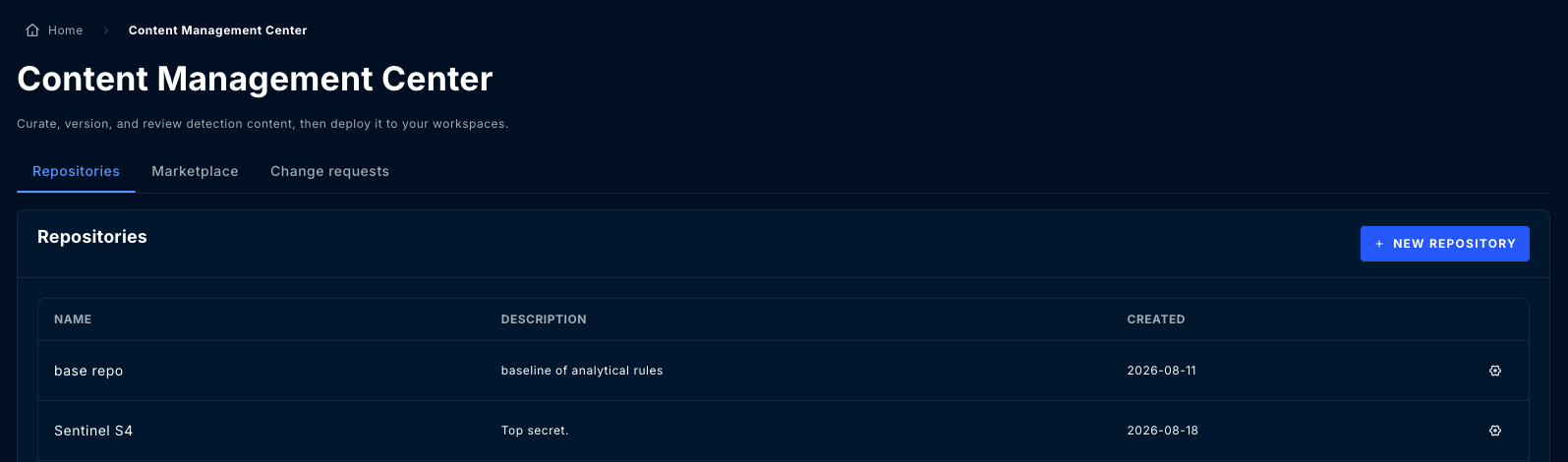
Navigate to **Content Management Center** and stay on the **Repositories** tab.
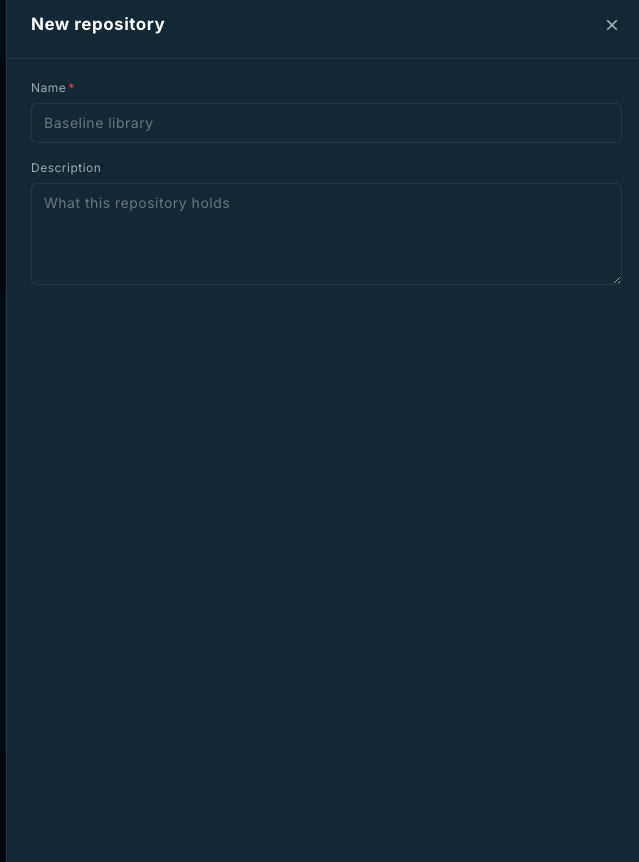
Give it a **Name** and an optional **Description**. That is all the dialog asks for, and
both are editable later.
A new repository is empty. [Import](/guides/content-management-center/rules#import-from-a-workspace),
[pull from the marketplace](/guides/content-management-center/marketplace), or author rules.
Covered workspaces and baseline protection are set **after** creation, from the
repository's tabs. Populate the repository first, then turn protection on before other
people start editing.
 ## Inside a repository
| Tab | What it is for |
| -------------------- | ----------------------------------------------------------------------------- |
| **Rules** | The content itself. Filter by platform, severity, and tags. |
| **Workspaces** | Which workspaces this repository covers, and the coverage state of each. |
| **Work in progress** | Edits waiting to be added to a change request. Appears when protection is on. |
| **Change requests** | Proposed changes under review. |
| **Settings** | Name and description, protection, and Sentinel defaults. |
| **Audit** | Every action taken in this repository, with actor and timestamp. |
## Inside a repository
| Tab | What it is for |
| -------------------- | ----------------------------------------------------------------------------- |
| **Rules** | The content itself. Filter by platform, severity, and tags. |
| **Workspaces** | Which workspaces this repository covers, and the coverage state of each. |
| **Work in progress** | Edits waiting to be added to a change request. Appears when protection is on. |
| **Change requests** | Proposed changes under review. |
| **Settings** | Name and description, protection, and Sentinel defaults. |
| **Audit** | Every action taken in this repository, with actor and timestamp. |
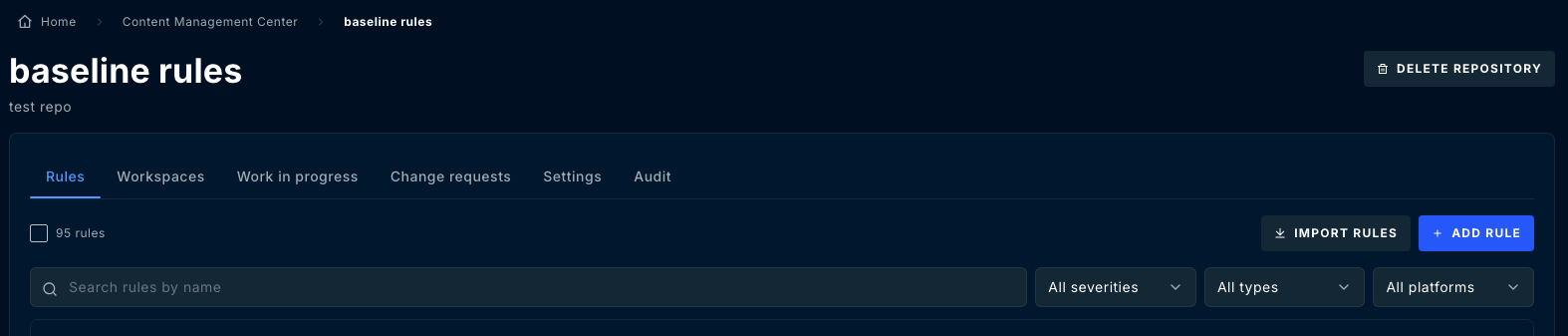 The **Rules** tab carries the repository's content, with search and filters for severity,
type and platform, plus **Import rules** and **Add rule**.
## Covered workspaces
A repository only deploys to workspaces you have added to it. This is deliberate: it stops
a rule intended for one customer reaching every workspace you manage.
Set this under **Settings**, or from the **Workspaces** tab. Only workspaces your
organization manages are eligible.
Removing a workspace from a repository does not remove rules already deployed there. It
stops future deployments and stops the workspace being scanned for drift. Remove the
deployed rules first if you want them gone.
## Baseline protection
The repository's rule set is its **baseline**. Baseline protection is what turns a
repository from a shared folder into a reviewed one, and it is configured under
**Settings**.
With **Require change requests** off, an edit changes the baseline immediately.
With it on, additions, edits, removals, imports and marketplace pulls are all staged for
review instead: each becomes a **work-in-progress item**, which must be added to a
**change request** and approved before it changes the baseline.
### Protection settings
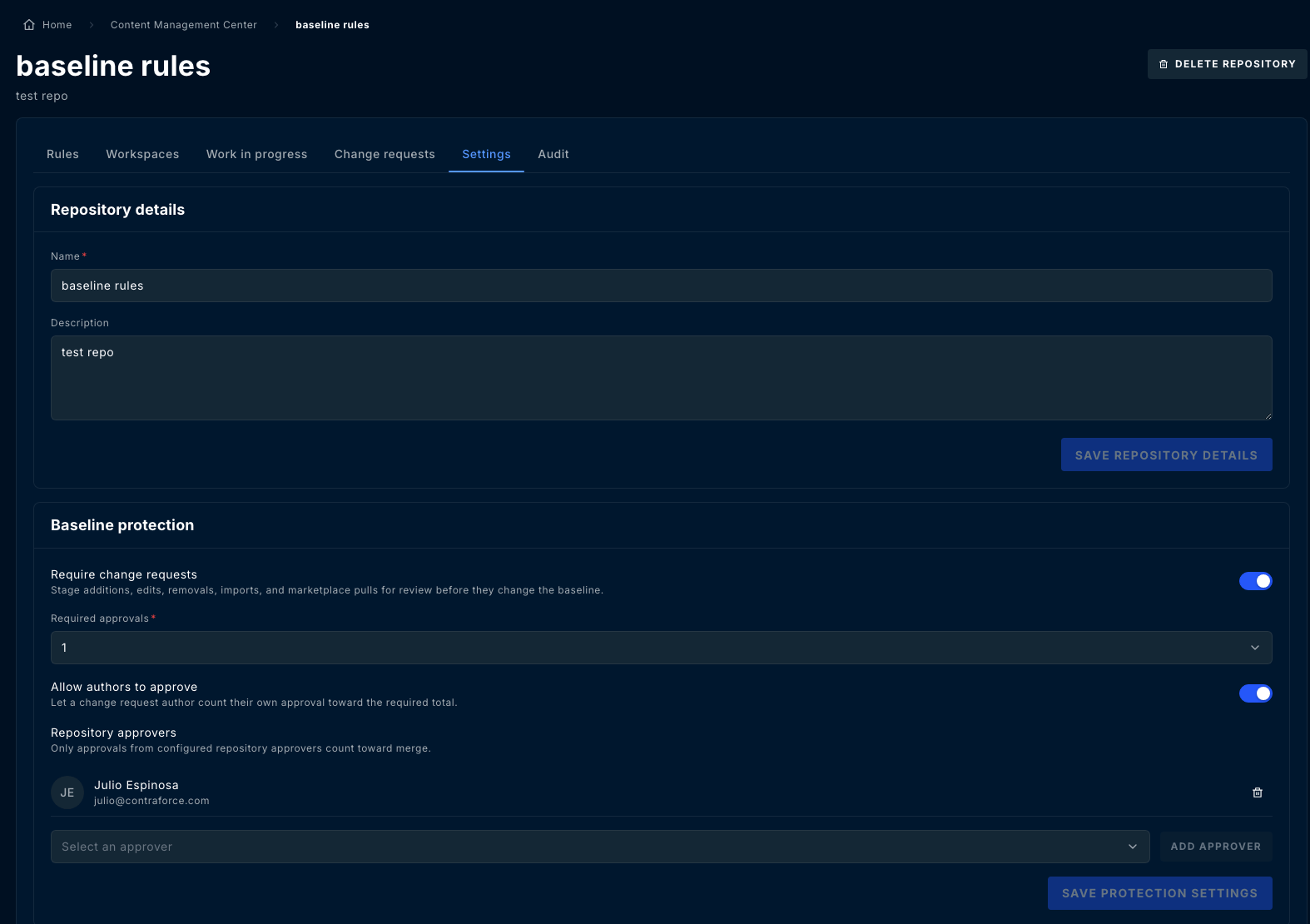
| Setting | Effect |
| ---------------------------- | -------------------------------------------------------------------------------- |
| **Require change requests** | Stages every change for review. Off means changes hit the baseline directly. |
| **Required approvals** | How many approvals a change request needs before it can merge. |
| **Allow authors to approve** | Lets a change request author count their own approval toward the required total. |
| **Repository approvers** | Only approvals from these people count toward merge. |
The **Rules** tab carries the repository's content, with search and filters for severity,
type and platform, plus **Import rules** and **Add rule**.
## Covered workspaces
A repository only deploys to workspaces you have added to it. This is deliberate: it stops
a rule intended for one customer reaching every workspace you manage.
Set this under **Settings**, or from the **Workspaces** tab. Only workspaces your
organization manages are eligible.
Removing a workspace from a repository does not remove rules already deployed there. It
stops future deployments and stops the workspace being scanned for drift. Remove the
deployed rules first if you want them gone.
## Baseline protection
The repository's rule set is its **baseline**. Baseline protection is what turns a
repository from a shared folder into a reviewed one, and it is configured under
**Settings**.
With **Require change requests** off, an edit changes the baseline immediately.
With it on, additions, edits, removals, imports and marketplace pulls are all staged for
review instead: each becomes a **work-in-progress item**, which must be added to a
**change request** and approved before it changes the baseline.
### Protection settings
| Setting | Effect |
| ---------------------------- | -------------------------------------------------------------------------------- |
| **Require change requests** | Stages every change for review. Off means changes hit the baseline directly. |
| **Required approvals** | How many approvals a change request needs before it can merge. |
| **Allow authors to approve** | Lets a change request author count their own approval toward the required total. |
| **Repository approvers** | Only approvals from these people count toward merge. |
 Turning protection on does not retroactively review anything. Rules already in the baseline
stay exactly as they are. It changes what happens to the **next** change.
**Required approvals** and **Repository approvers** are set independently, and nothing stops
you requiring more approvals than you have approvers. A repository configured that way
accepts change requests it can never merge. Check the two together.
While protection is on, a single change request is capped at a fixed number of items. If you
are migrating a large rule set, do it before you turn protection on, or split it across
several change requests.
## Sentinel settings
A repository can carry a **default target workspace** for Microsoft Sentinel. When a
deployment does not name a workspace explicitly, this is where it goes.
Set it under **Settings** if most of the repository's content is destined for one
workspace. Leave it unset to be asked every time.
## Audit
The **Audit** tab records every action against the repository: rules created, imported,
edited, deployed and rolled back; change requests opened, approved and merged; settings
changed. Each entry names the actor and the time.
This is a read-only record and cannot be edited or cleared.
## Deleting a repository
Requires the **Manage** permission.
Deleting a repository removes its rules and their version history from ContraForce. It
does **not** remove rules already deployed to workspaces. Those keep running, and are no
longer tracked by anything, so drift on them will stop being reported.
Turning protection on does not retroactively review anything. Rules already in the baseline
stay exactly as they are. It changes what happens to the **next** change.
**Required approvals** and **Repository approvers** are set independently, and nothing stops
you requiring more approvals than you have approvers. A repository configured that way
accepts change requests it can never merge. Check the two together.
While protection is on, a single change request is capped at a fixed number of items. If you
are migrating a large rule set, do it before you turn protection on, or split it across
several change requests.
## Sentinel settings
A repository can carry a **default target workspace** for Microsoft Sentinel. When a
deployment does not name a workspace explicitly, this is where it goes.
Set it under **Settings** if most of the repository's content is destined for one
workspace. Leave it unset to be asked every time.
## Audit
The **Audit** tab records every action against the repository: rules created, imported,
edited, deployed and rolled back; change requests opened, approved and merged; settings
changed. Each entry names the actor and the time.
This is a read-only record and cannot be edited or cleared.
## Deleting a repository
Requires the **Manage** permission.
Deleting a repository removes its rules and their version history from ContraForce. It
does **not** remove rules already deployed to workspaces. Those keep running, and are no
longer tracked by anything, so drift on them will stop being reported.