> ## Documentation Index
> Fetch the complete documentation index at: https://docs.contraforce.com/llms.txt
> Use this file to discover all available pages before exploring further.
# Workspace coverage and drift
> See what each workspace is running against the repository baseline, and resolve rules that were changed outside ContraForce.
Coverage answers a question the repository alone cannot: **what is running out there, and does
it still match the baseline?** Rules changed directly in a vendor console show up here
instead of staying invisible.
This page is written for fleet operators managing many workspaces, though the mechanics are
the same for one.
## What the coverage view is reading
Coverage shows what this repository **recorded** as live in the workspace. It is read from
deployment history, so it reflects the last synchronize or deploy rather than a fresh read
of the workspace. **Last recorded** is when ContraForce last wrote that record, not when
the rule last changed in the workspace.
To compare against what is running right now, use **Scan workspace**.
That distinction matters operationally. If someone edited a rule in the Azure portal an
hour ago and nobody has scanned since, the coverage view will still show it in sync. Scan
before you trust a clean board.
## Coverage states
Open a repository's **Workspaces** tab and select a workspace. Rules are grouped into five
views, each with a count:
| View | Meaning |
| ---------------- | ------------------------------------------------------------------------------------------ |
| **All** | Every rule in this record, whatever its state. |
| **In sync** | Matches the repository baseline. Nothing to do. |
| **Drifted** | The workspace copy no longer matches the baseline. Someone changed it outside ContraForce. |
| **Outdated** | Running an older baseline version. Nobody changed it; it simply has not been redeployed. |
| **Not deployed** | In the repository, absent from this workspace. |
The distinction that matters most is **drifted** versus **outdated**. Outdated is a gap you
close by deploying. Drifted means someone made a change you have not read yet, and
deploying over it destroys their work sight unseen.
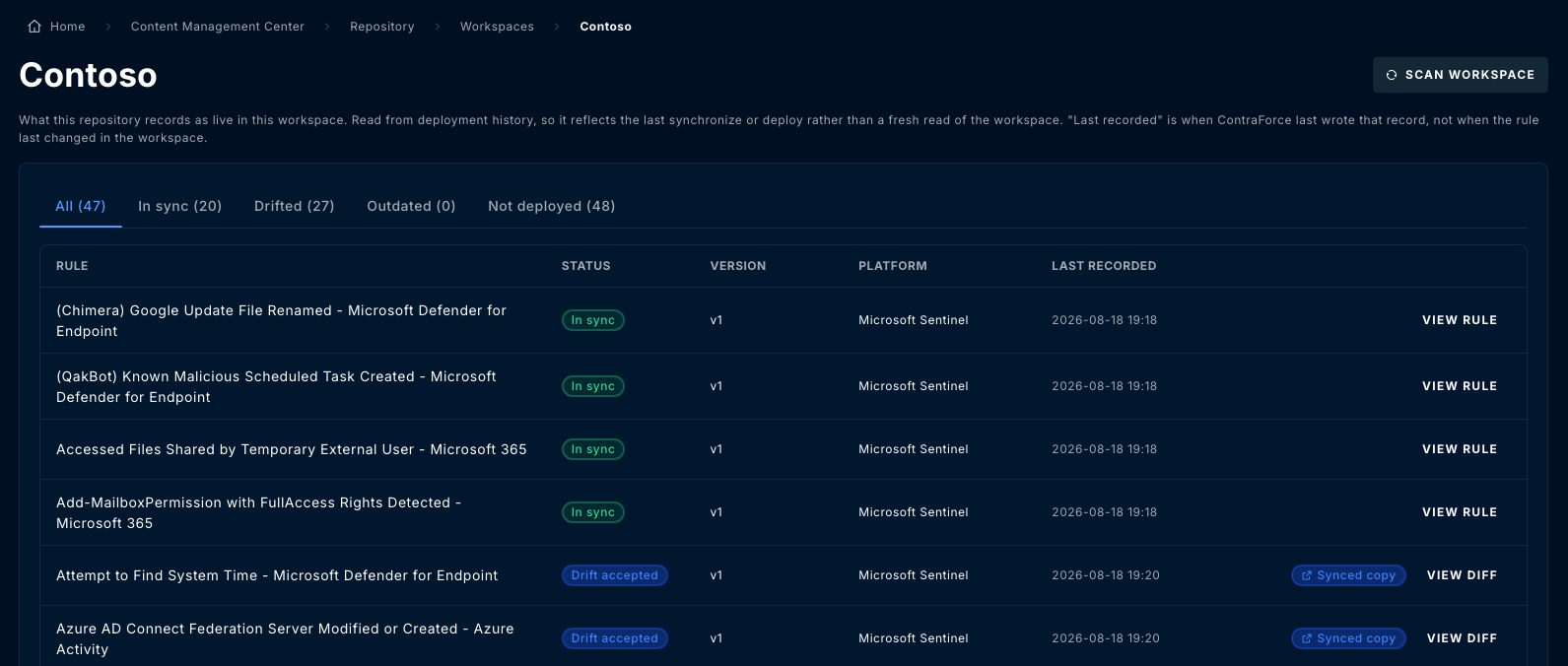 Each row shows the rule, its status, the baseline **version** it corresponds to, its
**platform**, and when it was **last recorded**. Rows offer **View rule**, or **View diff**
where the workspace copy differs from the baseline.
A rule whose difference has been deliberately accepted shows a **Drift accepted** status
and a **Synced copy** link to the live rule, so an intentional divergence stays visibly
different from an unreviewed one.
## Resolving drift
Select one or more drifted rules and choose an action. The same three actions are available
in bulk from the toolbar and per row from the row menu.
| Action | What it does | When to use it |
| --------------------- | ------------------------------------------------------------------------------ | ---------------------------------------------------------------- |
| **Accept drift** | Records that the difference is known and intended, and stops flagging it. | A deliberate local difference you want to keep. |
| **Adopt as baseline** | Takes the workspace's current definition and makes it the repository baseline. | The out-of-band change was an improvement worth giving everyone. |
| **Deploy baseline** | Overwrites the workspace copy with the repository baseline. | The out-of-band change was unwanted. |
Each row shows the rule, its status, the baseline **version** it corresponds to, its
**platform**, and when it was **last recorded**. Rows offer **View rule**, or **View diff**
where the workspace copy differs from the baseline.
A rule whose difference has been deliberately accepted shows a **Drift accepted** status
and a **Synced copy** link to the live rule, so an intentional divergence stays visibly
different from an unreviewed one.
## Resolving drift
Select one or more drifted rules and choose an action. The same three actions are available
in bulk from the toolbar and per row from the row menu.
| Action | What it does | When to use it |
| --------------------- | ------------------------------------------------------------------------------ | ---------------------------------------------------------------- |
| **Accept drift** | Records that the difference is known and intended, and stops flagging it. | A deliberate local difference you want to keep. |
| **Adopt as baseline** | Takes the workspace's current definition and makes it the repository baseline. | The out-of-band change was an improvement worth giving everyone. |
| **Deploy baseline** | Overwrites the workspace copy with the repository baseline. | The out-of-band change was unwanted. |
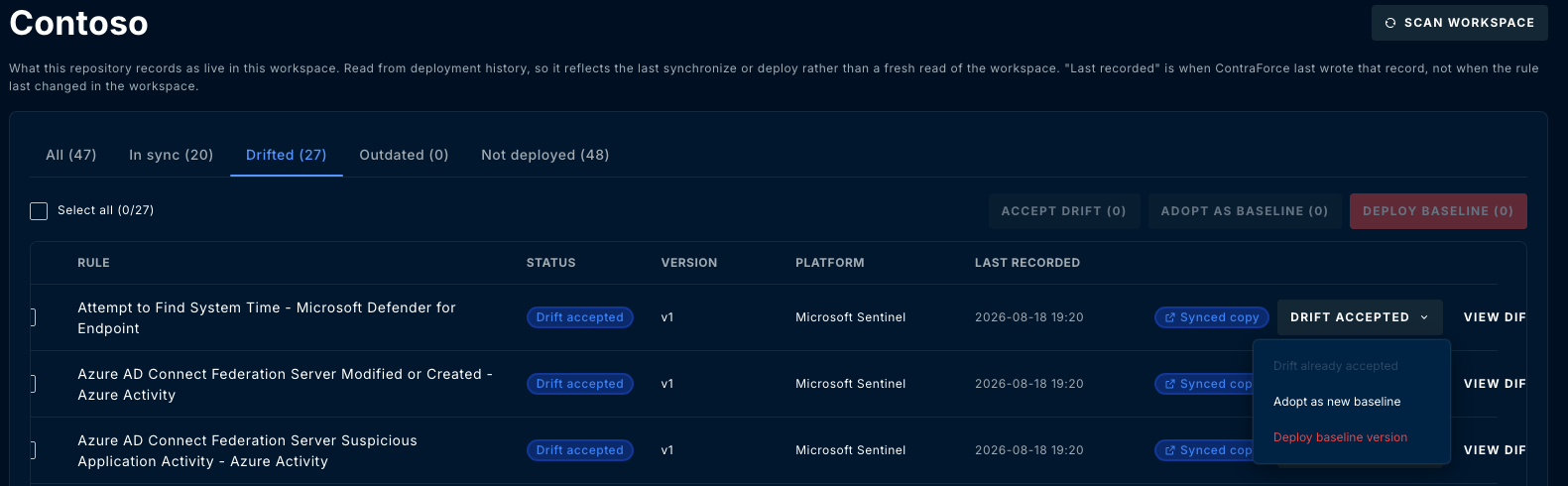 **Accept drift** silences a row, it does not make the two definitions match. The workspace
keeps running its own version. Accepting drift on a rule you actually wanted standardised
is how a fleet quietly diverges, so read the diff before reaching for it.
Once drift has been accepted on a rule, the row menu shows **Drift already accepted** and
offers the two remaining actions, so you can still change your mind later.
### Protection applies here too
Reconciliation is a change to the baseline like any other. In a repository with
[baseline protection](/guides/content-management-center/repositories#baseline-protection)
enabled, adopting a drifted rule does not silently rewrite the baseline: it becomes a
work-in-progress item and goes through a change request.
## Scanning
**Scan workspace** reads the workspace and refreshes the record. Run one when you want
current state rather than the last thing ContraForce wrote.
Scanning is scoped to a repository's covered workspaces. A workspace nobody added to a
repository is never scanned, which is the usual reason drift appears to be missing:
[add the workspace to the repository](/guides/content-management-center/repositories#covered-workspaces)
first.
## A working rhythm
The board reflects the last recorded state. Scan the workspaces under active change so
you are reading current reality.
It is unambiguous: deploy the current baseline and the gap closes.
Open the diff. Someone made that change for a reason. Decide whether it becomes the new
baseline, gets accepted as a local difference, or gets overwritten.
Decide whether each rule belongs in this workspace, and deploy the ones that do.
**Accept drift** silences a row, it does not make the two definitions match. The workspace
keeps running its own version. Accepting drift on a rule you actually wanted standardised
is how a fleet quietly diverges, so read the diff before reaching for it.
Once drift has been accepted on a rule, the row menu shows **Drift already accepted** and
offers the two remaining actions, so you can still change your mind later.
### Protection applies here too
Reconciliation is a change to the baseline like any other. In a repository with
[baseline protection](/guides/content-management-center/repositories#baseline-protection)
enabled, adopting a drifted rule does not silently rewrite the baseline: it becomes a
work-in-progress item and goes through a change request.
## Scanning
**Scan workspace** reads the workspace and refreshes the record. Run one when you want
current state rather than the last thing ContraForce wrote.
Scanning is scoped to a repository's covered workspaces. A workspace nobody added to a
repository is never scanned, which is the usual reason drift appears to be missing:
[add the workspace to the repository](/guides/content-management-center/repositories#covered-workspaces)
first.
## A working rhythm
The board reflects the last recorded state. Scan the workspaces under active change so
you are reading current reality.
It is unambiguous: deploy the current baseline and the gap closes.
Open the diff. Someone made that change for a reason. Decide whether it becomes the new
baseline, gets accepted as a local difference, or gets overwritten.
Decide whether each rule belongs in this workspace, and deploy the ones that do.