

Available insights vary by entity type and your connected data sources. The more integrations you have enabled, the richer your entity insights will be.
Why Entity Insights Matter
Faster Investigations
Access critical context without leaving ContraForce
Complete Picture
See related incidents, logs, and threat intel in one place
Better Decisions
Make informed response choices with full entity context
Available Insights by Entity Type
ContraForce provides different insights depending on the entity type associated with an incident.- User
- Device
- IP Address
- Email
- File
- URL
User entities include accounts, identities, and mailboxes.
Use cases: Investigating compromised accounts, tracking lateral movement, understanding user behavior patterns
Accessing Entity Insights
Follow these steps to view insights for any entity in an incident.1
Open the Incident
From the Command Page, click the Incident ID in the Incidents table to open the compact incident overview
2
Expand to Detailed View
Click the diagonal arrows icon (next to the X) in the top right corner to open the detailed incident view
3
Select Entities Tab
Click the Entities tab to see all associated entities
4
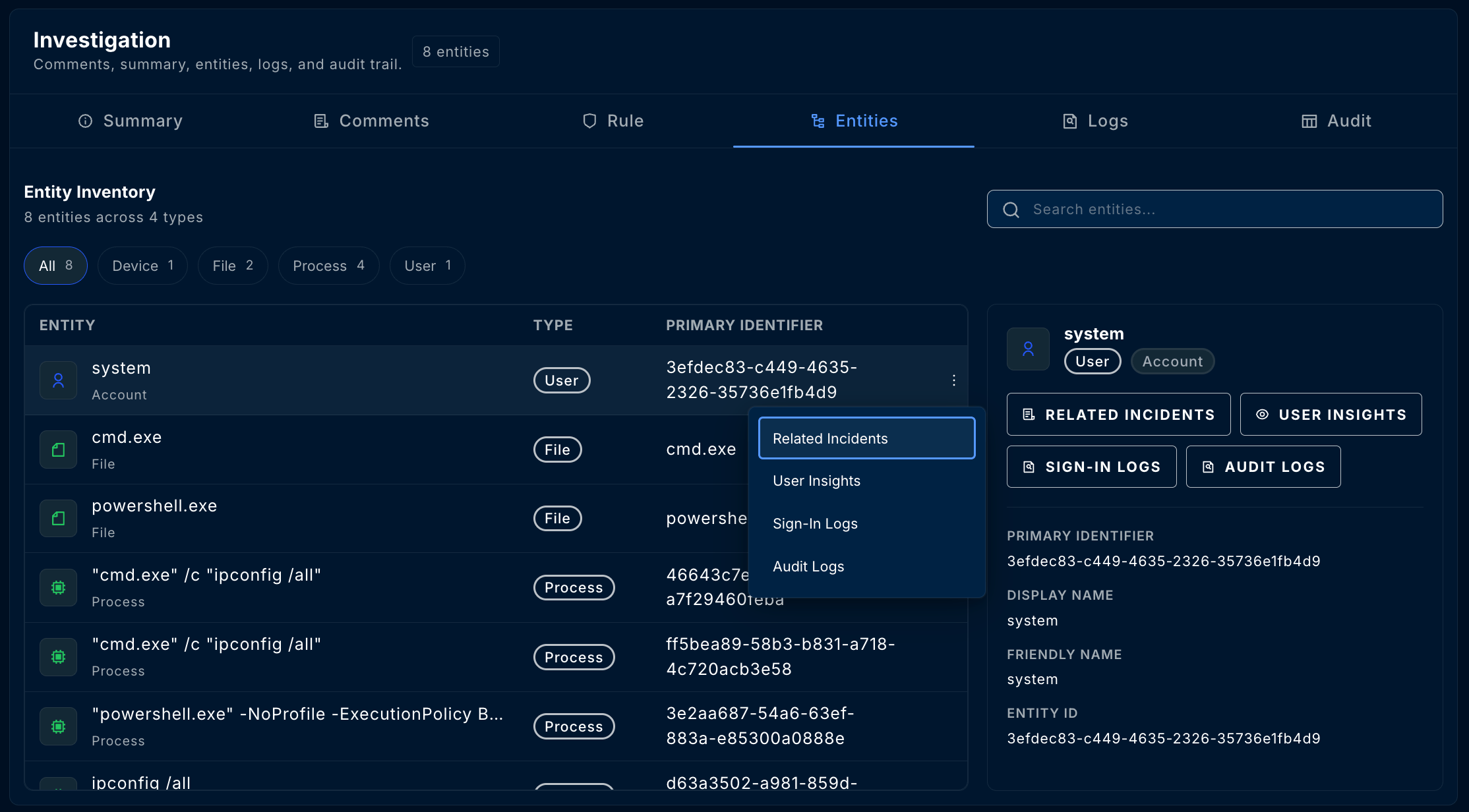
Open Entity Menu
Click the three dots (⋮) on any entity row to see available insights
5
Select Insight Type
Choose the insight you want to view from the dropdown menu
Working with Insights
Multiple Insights
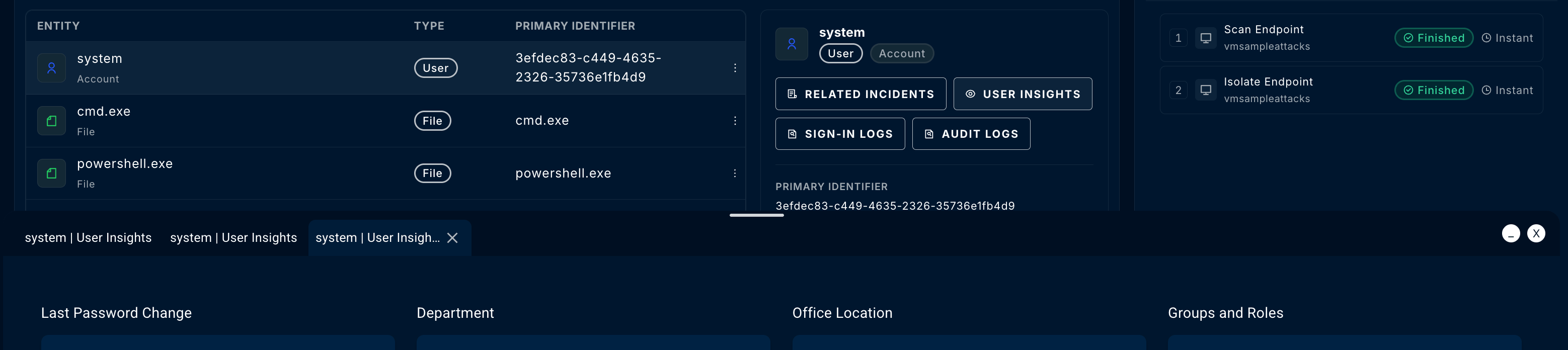
You can open multiple insights simultaneously:- Each insight opens in its own tab within the popup window
- Switch between tabs to compare information
- The popup window can be resized for better viewing
Insight Details
Each insight type displays relevant information in an organized format:Sign-In Logs
Sign-In Logs
Columns typically include:
- Timestamp
- Sign-in status (Success/Failure)
- IP address and location
- Device and browser information
- Conditional access results
- Risk level
Audit Logs
Audit Logs
Columns typically include:
- Timestamp
- Activity type
- Target resource
- Initiated by (user/service)
- Result (Success/Failure)
User Insights
User Insights
Information displayed:
- Display name and UPN
- Job title and department
- Manager
- Group memberships
- Account status
- Risk score
- Last sign-in
Device Insights
Device Insights
Information displayed:
- Device name and ID
- OS platform and version
- Health state
- Exposure level
- Last seen timestamp
- Compliance status
- Logged-on users
IP Insight Logs
IP Insight Logs
Information displayed:
- Geolocation (country, city)
- ASN and ISP
- Reputation score
- Associated domains
- Historical activity
- Threat intelligence matches
File Insights
File Insights
Information displayed:
- File name and path
- SHA256, SHA1, MD5 hashes
- File size
- First/last seen
- Detection ratio
- Threat intelligence enrichment
Related Incidents
The Related Incidents insight is available for all entity types and shows other incidents where the same entity appears.Why This Matters
- Pattern Detection — Identify if an entity is repeatedly involved in security events
- Attack Chain Analysis — Understand how an attacker moved through your environment
- Scope Assessment — Determine the full impact of a compromise
- False Positive Identification — Recognize legitimate activity that triggers multiple alerts
Using Related Incidents
Threat Intelligence Enrichment
Some entity insights include threat intelligence from integrated sources.Supported Enrichments
Threat intelligence enrichment requires integration with tools like VirusTotal or Microsoft Defender Threat Intelligence. Contact your administrator to enable additional enrichment sources.
Integration-Specific Insights
Available insights depend on which integrations are connected to your workspace.Microsoft Defender for Endpoint
- Device timeline and alerts
- User sign-in and audit logs
- Email trace and threat detection
- File and URL analysis
Microsoft Sentinel
- Log Analytics query results
- Custom entity enrichments
- Watchlist matches
- Threat intelligence indicators
Third-Party Integrations
Additional insights may be available based on your connected tools:- CrowdStrike — Device details, detection history
- SentinelOne — Agent status, threat indicators
Best Practices
Correlate sign-in anomalies
Correlate sign-in anomalies
Compare sign-in logs with the incident timeline. Look for unusual locations, impossible travel, or authentication failures before the incident.
Use audit logs for privilege escalation
Use audit logs for privilege escalation
When investigating compromised accounts, review audit logs for privilege changes, group membership modifications, or unusual administrative actions.
Check device timeline for malware
Check device timeline for malware
For device-based incidents, the timeline shows the sequence of events leading to detection—crucial for understanding initial access and lateral movement.
Document key findings
Document key findings
Copy important insight data to incident comments for team visibility and post-incident documentation.
Troubleshooting
Common Issues
Related Guides
Incident Management Guide
Complete incident investigation workflow
Security Workbench
Deep dive investigation interface
Gamebooks
Take action on entities after investigation
Questions about entity insights? Contact us at support@contraforce.com.