

Whether you manage 5 workspaces or 500, ContraForce scales with your business. All multi-tenant features are included in the platform at no additional cost.
Why Multi-Tenant Matters
Traditional security tools force analysts to log into each customer environment separately. ContraForce eliminates this friction:Single Pane of Glass
View all customer incidents in one unified dashboard.
Consistent Workflows
Operating procedure workflows automated across every workspace.
Efficient Staffing
One analyst can manage more customers effectively.
Command Dashboard: Your Central Hub
The Command Dashboard is the heart of ContraForce’s multi-tenant capabilities. It provides a unified view of all security incidents across your managed workspaces.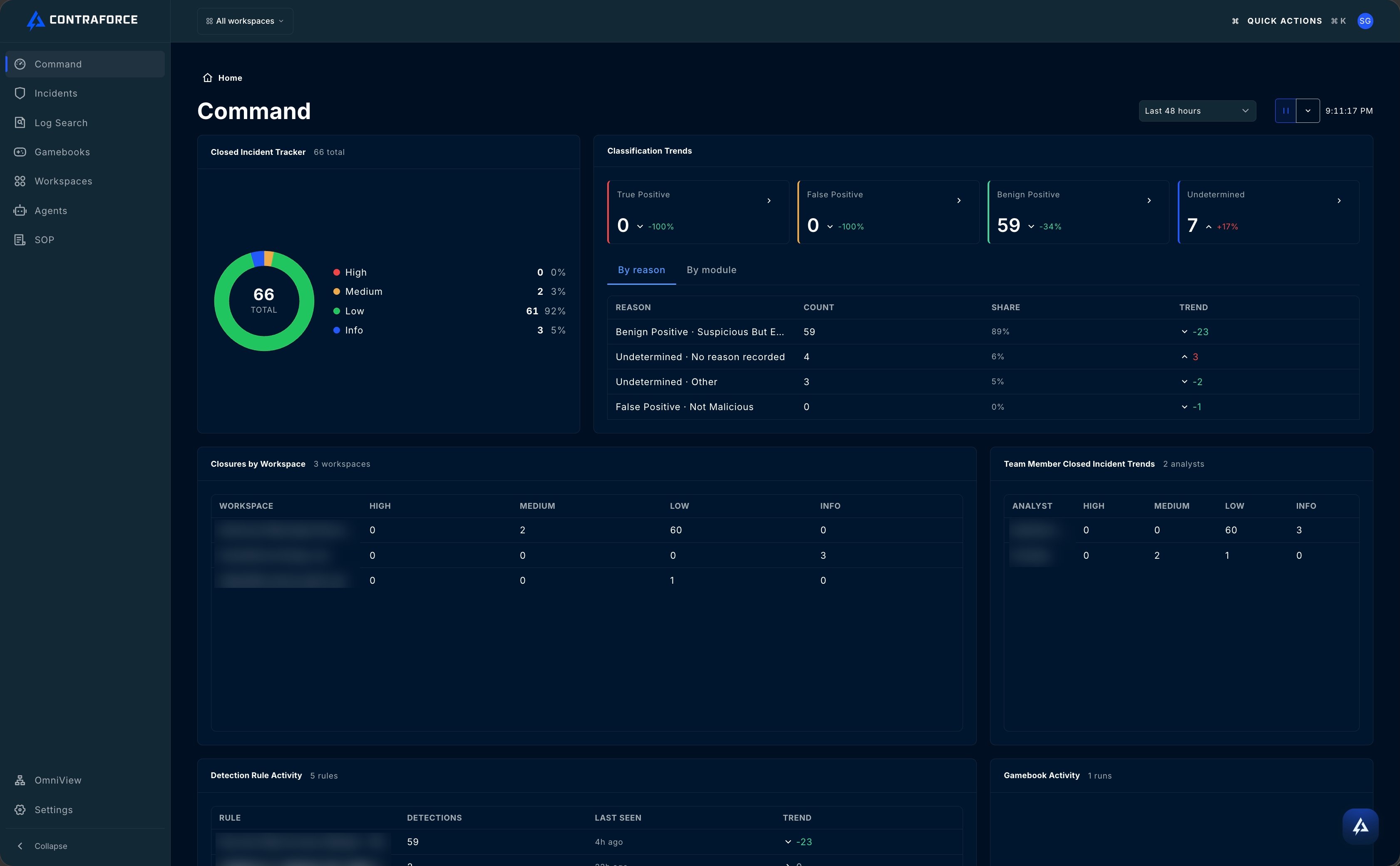
What You Can See
Default Behavior
By default, the Command Dashboard displays data for all onboarded workspaces. This gives you immediate visibility into your entire customer base without any configuration.Workspace Filtering
While seeing everything is powerful, sometimes you need to focus. The Workspace Filter lets you customize your view.How It Works
1
Open the Filter
Click the workspace dropdown in the top navigation bar
2
Select Workspaces
Check the workspaces you want to display (one, several, or all)
3
View Filtered Data
All dashboard cards and tables update to show only selected workspaces
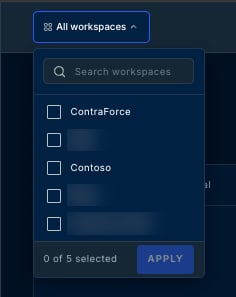
Filter Persistence
Your workspace selection persists as you navigate between pages in ContraForce:- Command Dashboard → Incidents Page → Gamebooks Page
- Your selected workspaces remain active throughout your session
- No need to re-select filters on each page
This persistence is especially useful when you’re focused on a specific customer’s issues and need to investigate across multiple ContraForce features.
Additional Filters
Beyond workspace filtering, you can further refine the Incidents table by:Multi-Tenant Incident Management
Managing incidents across workspaces follows the same workflow—but with added context about which customer is affected.Incident Table Columns
The Incidents table includes workspace identification:Incident Handling Across Workspaces
You don’t process cross-tenant incidents with a manual bulk action. Security Delivery Agents running on queue triage and act on incidents across all your workspaces automatically as they arrive. See Configuring Security Delivery Agents.Multi-Tenant Gamebook Activity
Track automated response actions across your entire customer base.Gamebook Activity Card
The Command Dashboard shows Latest Gamebook Activity with:- Workspace — Which customer the action was performed on
- Status — Success, Failed, Pending Approval
- Incident — Linked incident ID
- Owner — Who initiated the action
Approval Workflows
When Gamebook actions require approval, you can manage all pending requests from one location:- Navigate to the Gamebook Activity tab
- View pending approvals across all workspaces
- Approve or reject with full context
Workspace Management
The Workspace Center provides administrative control over your workspaces.Pre-Onboarding
Prepare customer environments before full deployment:- Create workspace placeholders
- Configure initial settings
- Streamline the onboarding process
Post-Onboarding Management
After onboarding, manage workspace configurations:- View onboarding status
- Access workspace settings
- Monitor integration health
Workspace Center
Complete guide to the Workspace Center.
Best Practices for Multi-Tenant Operations
Establish naming conventions
Establish naming conventions
Use consistent workspace names that clearly identify customers. This makes filtering and incident triage faster.
Create tiered response procedures
Create tiered response procedures
Define which incident types require immediate attention vs. scheduled review. Use severity filtering to prioritize.
Assign dedicated analysts per customer segment
Assign dedicated analysts per customer segment
For large deployments, consider assigning analysts to specific workspace groups to build customer familiarity.
Review the Command Dashboard daily
Review the Command Dashboard daily
Start each day with a Command Dashboard review across all workspaces to catch emerging issues early.
Monitor connector health proactively
Monitor connector health proactively
Don’t wait for incidents to reveal data flow problems. Check Data Connector Anomalies regularly.
Related Guides
Command Dashboard
Deep dive into the central dashboard.
Incident Management
Complete incident workflow guide.
Workspace Center
Manage workspace configurations.
User & Group Management
Manage Users and Groups.
Workspace Profiles
Apply the same workspace settings to many workspaces at once.
Quick Actions
Press Ctrl + K to jump between pages and workspace settings.
Questions about multi-tenant features? Contact us at support@contraforce.com.