

Who is this for? Service providers and security teams who want to extend the response actions their analysts and AI agents can run, and the engineers who build the endpoints behind those actions.
Availability: Custom actions are rolling out gradually. If you don’t see the Actions tab on the Gamebooks page, contact your ContraForce representative to enable it for your organization.
A Quick Refresher on Gamebooks
Gamebooks are ContraForce’s no-code incident response workflows. You pick an entity on an incident, such as a user or a device, add response actions to a plan, and run it. ContraForce executes each action against your connected security tools, with no API mapping, coding, or scripting. Every Gamebook follows the same lifecycle: it’s planned, checked against your workspace policies, approved when a policy or approver requires it, run, and recorded in the Gamebook history and the incident’s comments. Security Delivery Agents can build and propose Gamebooks too. Out of the box, Gamebooks ship with built-in actions for Microsoft Entra ID, Defender XDR, CrowdStrike, SentinelOne, and more. Custom actions let you add your own.What Are Custom Gamebook Actions?
A custom action is a response action you define, backed by an HTTPS endpoint you own. When a Gamebook runs it, ContraForce sends your endpoint a signed request that describes the run: the incident, the target with every identifier ContraForce knows for it, the workspace, and who asked for it. Your endpoint does the work and reports back. A custom action isn’t a second-class add-on. It goes through the same planning, policies, approvals, AI agents, live status, run history, and audit log as the actions ContraForce ships.Why Use Custom Actions?
Every security team has response steps that live outside Microsoft and the EDR: opening a ticket in the HR or ITSM system, disabling an account in an on-premises directory, notifying a business owner, or blocking a sender in a third-party email gateway. Until now, those steps happened in another tool after the Gamebook finished. Custom actions bring them into the Gamebook. For service providers, that means you can expand the action catalog your analysts and agents work from: build an action once, publish it to every workspace you manage, and offer your customers response capabilities beyond the built-in set.One place to respond
Analysts run your internal steps next to the built-in ones, in the same Gamebook, against the same incident and entities. No switching tools, no copying IDs by hand.
Your automation, our guardrails
The same policies decide whether a custom action runs, needs approval, or is blocked. Every run is audited.
Works with what you already built
If it can receive an HTTPS POST, it can be a custom action: Logic Apps, Power Automate, Azure Functions, AWS Lambda function URLs, ServiceNow or Jira automation webhooks, or your own service.
AI agents can use it, if you allow it
You decide per action whether Security Delivery Agents may propose it. The description you write tells the agent when it fits.
Results you can see
Your endpoint can report a message and its own values, such as a ticket number, and they appear on the run, live.
Long-running work is supported
An endpoint that waits on an approval or a slow system can answer right away and report progress for up to 10 minutes.
Where Custom Actions Apply
Every workspace or one workspace
Choose where an action lives when you create it.Any entity, the incident, or every entity at once
Each action has a Target that decides what it acts on and where ContraForce offers it.
ContraForce sends every identifier it knows for the target, so your endpoint doesn’t have to look them up.
Custom Actions vs. Webhooks
At its core, a custom action is a signed HTTPS POST to your endpoint, just like a webhook. The difference is that a webhook only tells you something happened. A custom action is a response step, and it shares the full Gamebook lifecycle inside ContraForce.The lifecycle of a custom action run
1
You define the action once
Give it a name, a description, a target, its endpoint, and how ContraForce authenticates to it.
2
ContraForce offers it where it fits
A custom action on users appears next to the built-in user actions on every user entity, in every workspace that can use it.
3
Gamebooks run it like any other action
Policies and approvals apply first. Then ContraForce sends your endpoint a signed request describing the run.
4
Your endpoint reports back
An immediate endpoint answers within 30 seconds. A long-running endpoint answers at once and reports through an update link for up to 10 minutes.
5
Everything is recorded
The run appears in the Gamebook history and the incident’s comments, and changes to custom actions are in the audit log.
Prerequisites
Before you start, have these ready:
- An HTTPS endpoint on a public internet address. Private addresses,
localhost, and cloud metadata addresses are refused. Redirects aren’t followed, so use the final URL. - How ContraForce authenticates to it, if the URL alone isn’t enough: a bearer token, a user name and password (basic authentication), or an API key in a header such as
x-functions-keyorOcp-Apim-Subscription-Key. A Logic App or Function URL that already carries its key (sig=orcode=) needs nothing else. - Firewall rules, if your endpoint isn’t open to the internet. Ask your ContraForce representative for the outbound addresses for your region.
Set Up a Custom Action
1
Open the Actions tab
In the ContraForce portal, open Gamebooks and select the Actions tab. Under Custom actions, you’ll see two sections: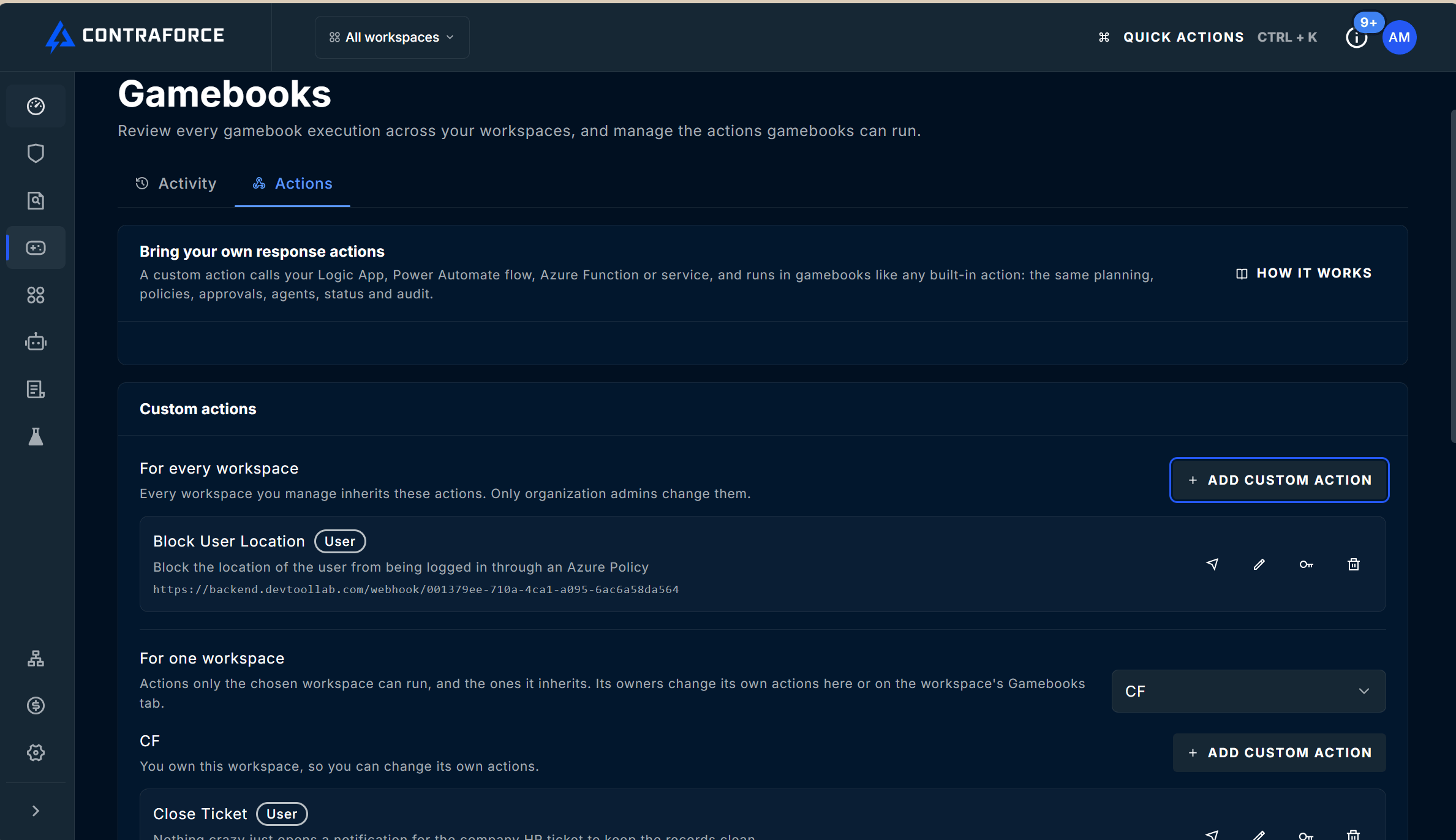
- For every workspace: the actions every workspace you manage inherits. Only Org Admins can change them.
- For one workspace: choose a workspace from the drop-down to see its own actions and the ones it inherits.
2
Add the action
Select Add custom action in the section where the action should live. The Add custom action panel opens.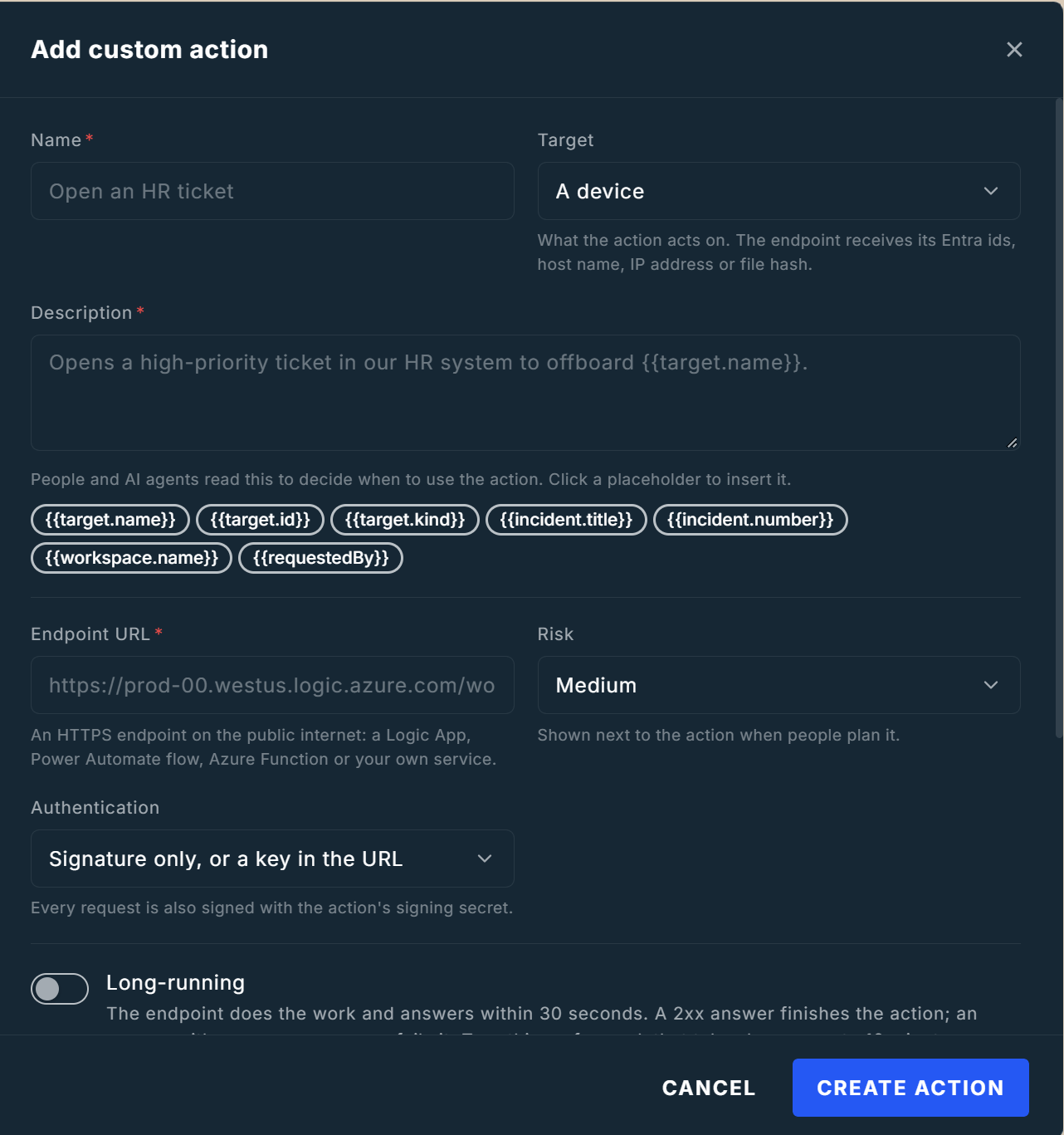
3
Save and copy the signing secret
Select Create action. ContraForce shows the action’s signing secret once. Copy it and store it with your endpoint, for example in Azure Key Vault or your flow’s secure inputs. Your endpoint uses it to verify that a request really came from ContraForce.
4
Test the action
Select Test (the send icon) on the action’s row. ContraForce sends a signed test request with the header
X-CF-Test: true and shows whether the endpoint answered, its status code, and how long it took.A test never runs against a real target. Make sure your endpoint recognizes the test header and does nothing real.5
Run it
Open an incident, choose an entity in the Investigation graph, and select your action next to the built-in ones. It’s added to the Gamebook plan in the Response panel. Select Run Gamebook.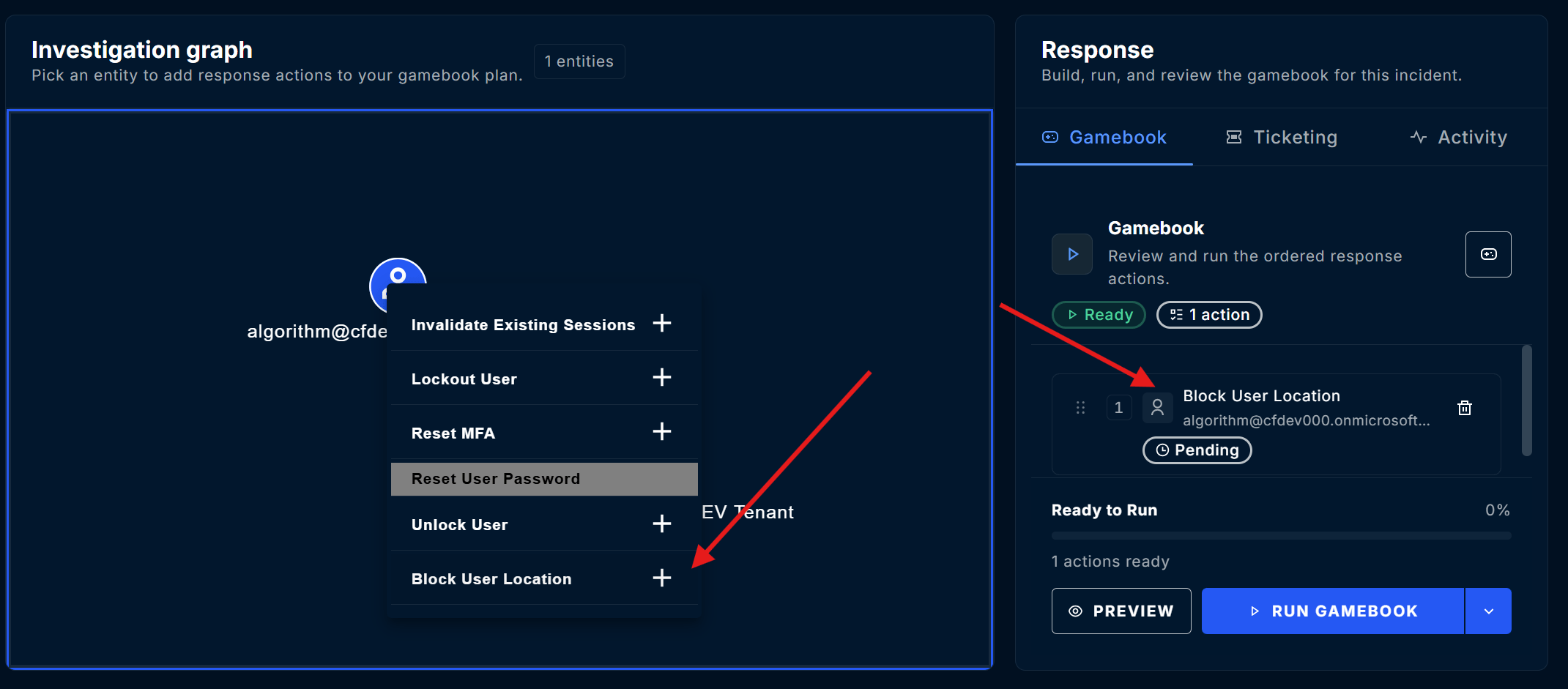
Other ways to run a custom action
- From the Gamebook planner: add the action to a Gamebook like any other action.
- Without an incident: if Runs without an incident is on, run it directly on a user, device, or other target.
- By an AI agent: if AI agents can use it is on, Security Delivery Agents may propose it when the description fits the incident.
Description placeholders
Placeholders in the description are filled in for each run, and the filled-in text is sent to your endpoint assummary. Click a placeholder chip in the panel to insert it.
For example:
Opens a high-priority ticket in our HR system to offboard {{target.name}} for incident {{incident.number}}.
Policies and Approvals
Custom actions appear in the workspace policy builder next to the built-in actions, so a run policy can allow, block, or ask an approver first for them, just like any other action. Requires approval on the action itself always queues the Gamebook for one of the workspace’s Gamebook approvers, whatever the policies say. Keep it on for actions that change something outside ContraForce.Build Your Endpoint
This section is for the engineer who builds the endpoint behind the action.The request
ContraForce sends onePOST with a JSON body and these headers:
Example body for an action on a user:
The contract is versioned. Fields may be added in version 1 but never renamed or removed, so ignore fields you don’t recognize.
Verify the signature
Always verify the signature before you act, and refuse requests whose timestamp is more than a few minutes old. Sign the raw body exactly as received, before any JSON parsing.Answer an immediate action
Do the work and answer within 30 seconds.Answer a long-running action
Answer at once, for example with202 Accepted. Then POST reports to the callback.url from the request as the work progresses, and a final succeeded or failed report when it’s done.
The update link:
- Needs no extra authentication. The link itself is the secret, so keep it private and don’t log it.
- Works only while the action is running, for at most 10 minutes.
- Stops working after the first
succeededorfailedreport. - Answers
202when a report is accepted, and404when the link is unknown, expired, or already finished.
The report
An answer or an update can carry a report. Every field is optional.
A report sent to the update link can be up to 32 KB.
Example: an Azure Logic App
1
Create the trigger
Create a Logic App with the When an HTTP request is received trigger. Copy its URL. It already carries its
sig key, so choose Signature only, or a key in the URL as the authentication.2
Verify the signature
Add a step that verifies
X-CF-Signature, for example an Azure Function or an inline code action that reads the signing secret from Key Vault. Return 401 when it doesn’t match.3
Handle test requests
If the request has the
X-CF-Test header, return 200 and stop.4
Do the work
Read
target.properties.userPrincipalName, incident.number, and summary from the body, and create your ticket.5
Report the result
Return
200 with a report: { "status": "succeeded", "message": "Ticket created", "metadata": { "ticket": "<id>" } }.202 right away, and POST the result to callback.url when it’s done.
Manage Custom Actions
From the action’s row on the Actions tab, or the workspace’s Custom actions card:
To pause an action without deleting it, edit it and clear Enabled. It stays saved but isn’t offered.
Creating, changing, replacing the secret of, testing, and deleting a custom action are all recorded in the audit log.
Security
- Signed requests. Every request carries an HMAC-SHA256 signature and a timestamp, so your endpoint can reject forged and replayed requests.
- Public HTTPS only. ContraForce checks every address it connects to, refuses private, loopback, link-local, and cloud metadata addresses, and never follows redirects.
- Fixed egress addresses. Requests leave from ContraForce’s fixed outbound addresses for your region, so you can allow only those.
- Secrets stay secret. The endpoint URL, credential, and signing secret are stored encrypted. The full URL and credential are never shown again after you save; the signing secret is shown only when created or replaced.
- No shared state between customers. Requests never carry cookies or another workspace’s session state.
- One run, one call. A run calls your endpoint once. A retry is a new run with a new
Idempotency-Key, started by a person. - The same controls as built-in actions. Policies, approvals, role checks, and the audit log apply to every custom action.
Troubleshooting
FAQ
Can one action call different systems per workspace?
Can one action call different systems per workspace?
An action for every workspace calls the same endpoint for all of them, and the request names the workspace (
workspace.id and workspace.name). Route on that in your endpoint, or create an action per workspace.Does a custom action need Microsoft consent in the workspace?
Does a custom action need Microsoft consent in the workspace?
No. It calls your endpoint, not Microsoft, so it needs no Microsoft Graph or Defender consent. When ContraForce can’t look a user up in Microsoft Entra ID, it still sends the user principal name and email address it has.
Can AI agents run custom actions without a person?
Can AI agents run custom actions without a person?
Only if you turn on AI agents can use it, and only within the workspace’s policies and approvals. Leave Requires approval on to have a person approve every run.
What happens if my endpoint receives the same run twice?
What happens if my endpoint receives the same run twice?
ContraForce sends each run once. Use the
Idempotency-Key header to detect a repeated delivery from your own infrastructure.Can a custom action patch systems or fix vulnerabilities?
Can a custom action patch systems or fix vulnerabilities?
Custom actions are for incident response: containment and notification steps that run during a Gamebook. ContraForce doesn’t provide vulnerability remediation, such as patching or configuration hardening.
Related Guides
What Are Gamebooks?
Build, run, and approve Gamebooks with the built-in response actions
Workspace Policies
Allow, block, or require approval for Gamebook actions, including custom ones
Configuring Security Delivery Agents
Control when AI agents build and run Gamebooks
Roles and Permissions Reference
See which roles can manage custom actions and run Gamebooks
Questions about custom Gamebook actions? Contact us at support@contraforce.com.